Replace FileMaker without losing what made it work.
Your FileMaker system runs invoicing, orders, or the workflow your staff have used for twenty years. It is also aging: one server, one developer who knows it, licensing costs that climb, and no path to the web, integrations, or the reporting your business needs now. I migrate FileMaker systems into production web applications you own outright, and I keep the record-oriented workflow your staff actually rely on.
For the FileMaker deployment that has run your invoicing, orders, or operations for a decade or two and now depends on one aging server, one license, and a shrinking pool of people who understand it.
Who needs a FileMaker replacement
Who this is for
- Companies running a 10+ year FileMaker or Access system that staff genuinely depend on, where replacement has to preserve the workflow, not just the data.
- Operations resting on a single point of failure: one aging server, one license bill, one person who understands the scripts.
- Owners burned by a previous migration attempt who need the next one rehearsed, verified, and reversible before anyone throws a switch.
Where this engagement starts
Why FileMaker replacements fail when they fail
FileMaker earned its place. It gave a non-technical business real databases, fast record navigation, found sets, and printable documents, and it accumulated twenty years of how your company actually works: sequential invoice numbers with meaning, free-text fields staff depend on, edge cases no off-the-shelf product would tolerate. That is exactly why replacing it is delicate. A generic rebuild loses the workflow. A bad migration loses the data. Doing nothing loses the business the day the server or the last developer is gone.
Outcomes
What the reference FileMaker migration delivered
- ZeroOperational downtime at cutoverSource: Fine's Gallery FileMaker retirement, production cutover
- 28,062Invoices migrated with full historySource: Fine's Gallery FileMaker retirement, verified by count and content
- 0Duplicate records after migrationSource: Unique invoice numbers verified; 350 legacy payments backfilled
- Exit code 0Payment-ledger audit resultSource: Strict reconciliation audit at cutover
- 20+Years of history preservedSource: Continuous invoice numbering carried into the new platform
Credentials and Fit
Directly relevant experience for high-trust delivery
I lead architecture and implementation personally, with technical depth that spans product, cloud, and execution operations.
AWS Certified Solutions Architect - Professional
My ability to use AWS to solve complex business requirements has been demonstrated at the highest enterprise level.
AWS Certified Solutions Architect - Associate
Cloud decisions are grounded in secure, cost-aware architecture with practical production tradeoff management.
Dual technical foundation
B.S. Computer Science plus B.S. Chemistry with undergraduate research and scientific presentation discipline.
The FileMaker scenario, specifically
FileMaker deserves more respect than it gets from the people selling its replacement. In the late nineties and two-thousands it gave non-technical businesses something genuinely rare: real databases, fast record navigation, found sets, printable documents, and the ability to shape software around how the business actually worked. Companies built their operations on it, and then they built twenty years of institutional knowledge into it: sequential invoice numbers that map to real sales history, free-text fields staff use in ways no schema anticipated, layouts tuned by two decades of daily use.
The problem is not that FileMaker was a bad choice. The problem is what two decades does to any system: the deployment now lives on one aging server or one aging Mac, the developer who understood the scripts is gone or going, licensing costs climb annually, and the system cannot reach the web, your commerce platform, or the integrations the rest of your operation runs on. The business has outgrown the container. The knowledge inside it is irreplaceable. Both things are true at once, and that tension is exactly what a FileMaker migration has to resolve.
What the migration actually involves
Workflow archaeology before code. I sit with the people who use the system and map what actually matters: which finds they run, which layouts they live in, which printed documents customers expect, which fields hold the tribal knowledge. FileMaker systems are full of behavior that looks like clutter and is actually load-bearing. The replacement preserves what matters and deliberately retires what was a workaround.
Data fidelity, proven not promised. FileMaker data is famously messy in exactly the ways that make businesses work: stacked names, pasted email blocks, shipping notes in address fields, custom line items. Migration runs are rehearsed against a full copy of the real database and verified by record count and by content, with the historical numbering that carries business meaning preserved exactly. The rehearsal repeats until every number matches.
Parity, then improvement. Staff get FileMaker-style search, fast record navigation, and familiar documents on day one, then capabilities FileMaker never had: simultaneous multi-field search, web access from anywhere, and native integration with commerce, shipping, email, and accounting, QuickBooks included.
Risk-managed cutover. The old system keeps running until parallel verification says the new one is right, staff sign off, and cutover becomes a switch with a rollback path. The reference migration recorded zero days of operational downtime.
The full delivery discipline behind these four commitments, the phased plan, the reconciliation gates, the rollback criteria, is documented once, on the Legacy System Replacement page. This page stays about FileMaker.
What actually replaces it
Be precise about the artifact, because the mental picture matters. FileMaker was never a peripheral. Functionally it is a data model, forms over that data, scripts, printable documents, and multi-user access to an operational system of record. That is a platform. It was your operations platform, built around 2003, and it earned twenty years of trust doing exactly that job. So the question was never how to integrate FileMaker into your platform. For most businesses this size, FileMaker IS the platform. There is nothing else to integrate into.
What replaces it is an operations application on a platform foundation your business owns: your data in a production Postgres database, an admin your staff use from any browser, the documents and searches they already know, running in your AWS organization. The first module is whatever FileMaker did for you. The foundation underneath it is deliberately built to absorb what comes next, the Access database, the spreadsheet chain, the QuickBooks sync, the storefront, at your pace, or never. FileMaker was a platform in 1998. Its replacement should be one too.
The product category FileMaker pioneered, a rapid application platform over a real database, now has open-source successors you can own outright: the same forms-over-data model, found sets become filtered views, scripts become server-side logic, printouts become a document renderer matched to your paperwork, except the runtime is yours and the data sits in a database any engineer can work with. That is what the reference build used, and the stack is documented one click down for whoever advises you technically.
One more thing worth saying plainly, since this site publishes an ownership standard and six questions to ask any vendor: run those questions against FileMaker itself. Who owns the runtime? Claris. Can another qualified operator run the system outside that runtime? No. What does it cost versus the value? Per-seat licensing that continues for as long as the system runs. Who maintains it? Often one person who knows the scripts. A newer FileMaker deployment or Claris Cloud may improve supportability, but it preserves the same proprietary runtime dependency. A client-owned replacement removes that dependency, and I can remain the engineer responsible for operating and improving what replaces it.
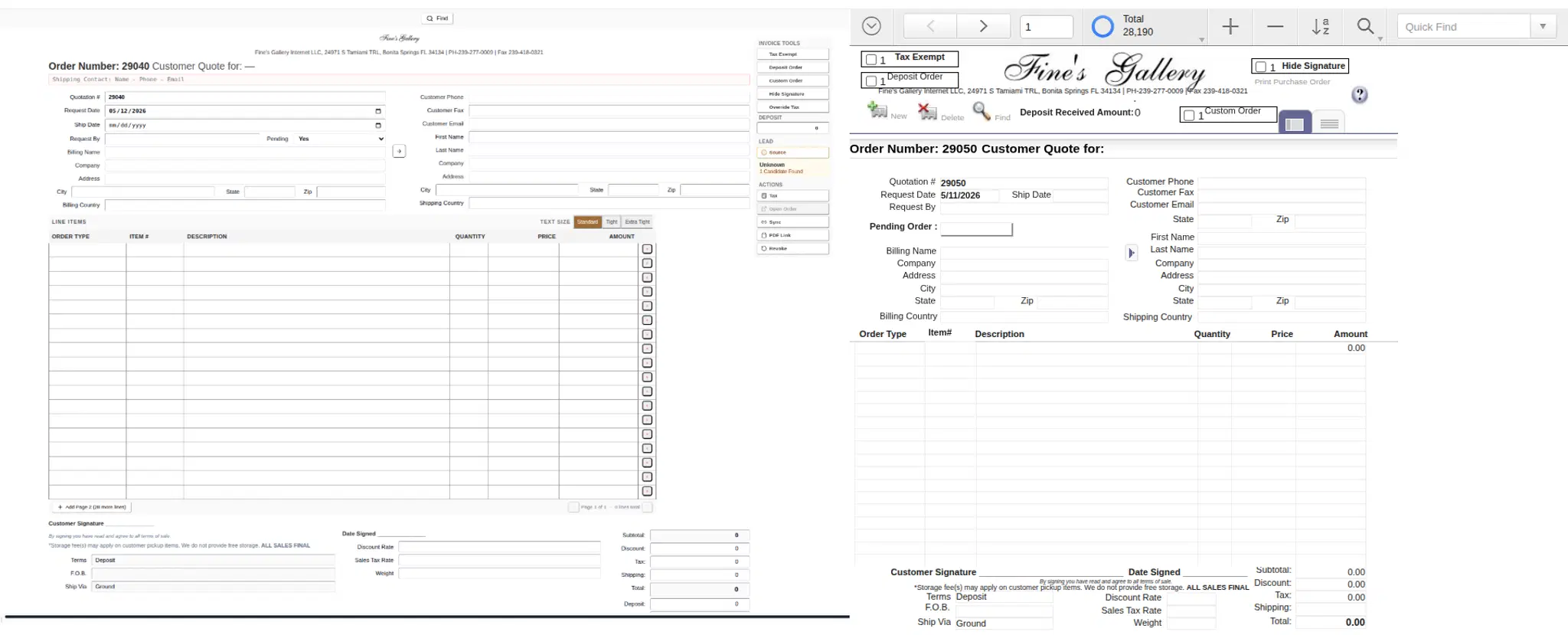
New Payload-backed invoice editor on the left, legacy FileMaker invoice view on the right. The replacement preserved the operational shape staff relied on for over two decades.
The same find flow inside the new Payload-backed admin: click the field, type the criteria, execute. Search behavior staff already know, on top of a platform-native data model.
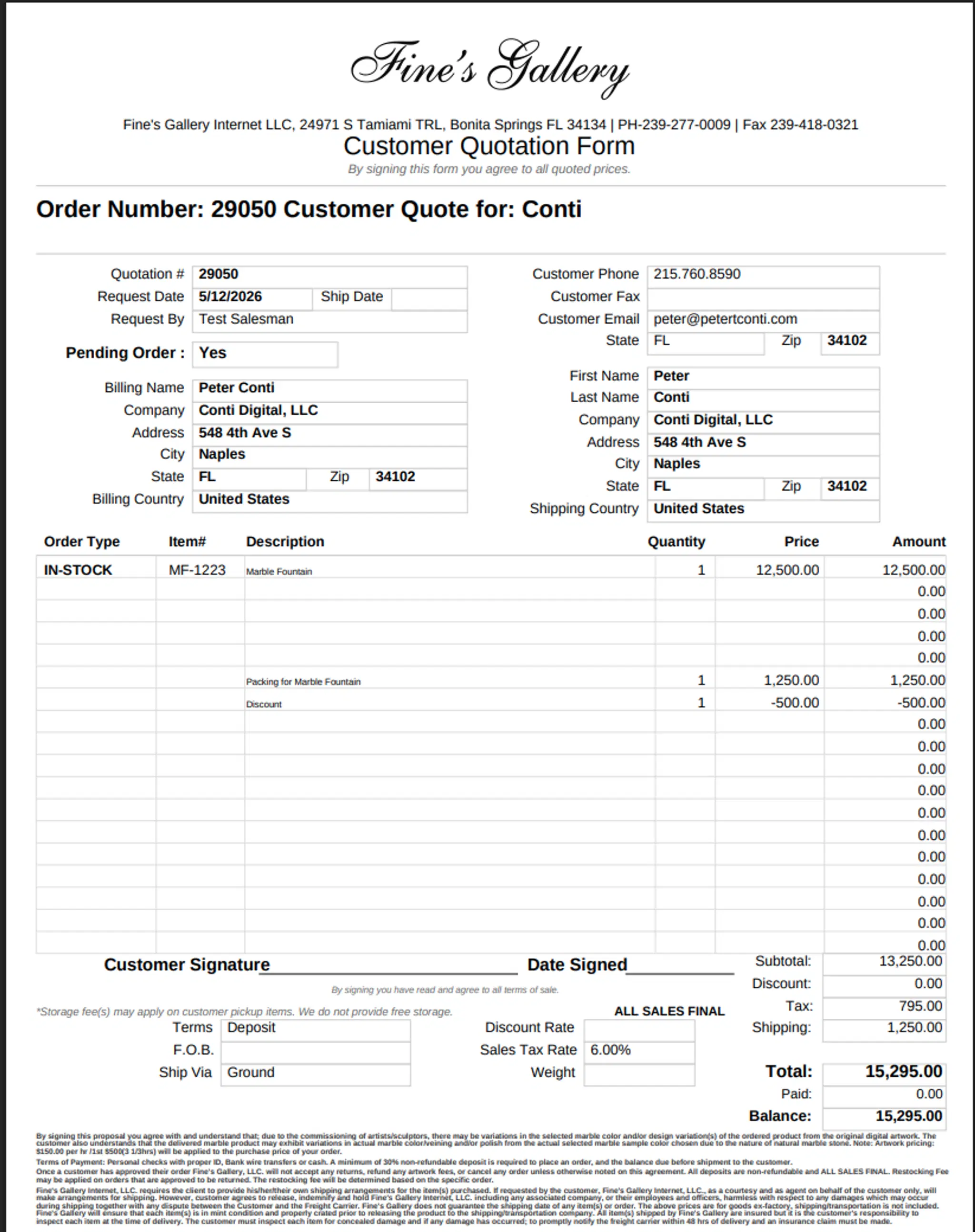
The new platform-rendered quote PDF: same recognizable layout, generated by a renderer that shares its planning layer with the admin editor preview.
The reference migration, in numbers
Fine's Gallery, a Bonita Springs luxury retailer whose orders routinely reach six figures, ran quoting and invoicing on FileMaker for more than twenty years. The migration moved 28,062 invoices with full history and continuous numbering, recorded zero days of operational downtime at cutover, and ended the 20-plus-year FileMaker dependency and the tens of thousands in annual licensing fees that rode on it. The replacement became part of an owned commerce platform now supporting millions in annual revenue. The engineering deep dive documents the found-set navigation, the data model, the PDF fidelity work, and the migration process itself; the platform case study covers what the business built on top of it.
What you own afterward
A web application your whole team can use from anywhere, running in an AWS account registered to your business, with source code in your repositories and data in a production database with backups, encryption, and an audit trail. No per-seat FileMaker licensing. No single aging server under a desk. No dependency on the one person who knew the scripts, including me: the system is delivered to the Ownership Standard and passes its continuity test. I can keep operating, maintaining, and extending the invoicing platform after cutover while the client retains control of the system.
When not to replace FileMaker
Honest scoping cuts both ways. If your FileMaker system is stable, effectively single-user, and the cost of its failure is an inconvenience rather than a stopped business, keep it and spend nothing. If the pain is one missing report or one integration, a targeted bridge may cost a tenth of a rebuild and buy you years. Replacement earns its price when the system is business-critical and multi-user, when it blocks the web or the integrations your operation needs, or when it rests on a single point of failure: one server, one license, one person. The Architecture Sprint makes that call in writing before you commit to anything, and it sometimes concludes: not yet.
The entry path
Start with a Platform Architecture Sprint: $15,000, three weeks: a risk register for your specific FileMaker deployment, the target architecture, the migration plan, and the cost model, in writing. The sprint is the branch evaluation: replace and become the system of record, absorb into a platform you already own, or bridge FileMaker with the one integration that was the actual pain. Some sprints conclude with the bridge, at a tenth of the cost, and say so. The sprint fee is credited in full against the subsequent build when I perform the build. Builds start at $80,000 and typically run three to six months to a rehearsed cutover with rollback criteria and an agreed downtime objective. Pricing is published. FileMaker replacement is a specialization of Legacy System Replacement; if your legacy system is Access, a spreadsheet chain, or a custom internal app, that page is the wider door.
The approach
How a FileMaker replacement reaches cutover safely
The delivery discipline is documented in full on the Legacy System Replacement page: audit, rehearse against production clones, verify by count and content, cut over with rollback criteria defined in advance. This page covers what is specific to FileMaker.
What you receive in a FileMaker replacement
- A production operations application in your AWS organization, with your FileMaker data migrated, verified by count and content, and owned outright
- FileMaker-parity workflows: found-set style search, fast record navigation, and the printed documents your customers already know
- The Ownership Standard: client-controlled repositories, Terraform, runbooks, and a continuity test that passes while I can remain the operator. The complete deliverables list lives on the Legacy System Replacement page
FAQ
FileMaker replacement questions
The Architecture Sprint is $15,000 and produces a written plan with a firm build quote. Builds start at $80,000 depending on scope, and the sprint fee is credited in full against the build when I perform it. If a targeted fix would serve you better than a rebuild, the sprint says so.
Three to six months from sprint to cutover for a business-critical system, depending on data volume, workflow complexity, and integrations. The reference migration moved a 20-year system in that window while the business kept operating.
No. The old system keeps running while the replacement is built and rehearsed. Cutover happens only after parallel verification, and the reference migration recorded zero days of operational downtime.
They migrate. Record counts are verified, content is verified, and historical numbering that carries business meaning is preserved. The reference migration carried 28,062 invoices with full history and continuous numbering.
In an AWS account registered to your business, on your domain, with source code in your repositories, delivered to the Ownership Standard. I can remain responsible for operating, maintaining, and extending it after cutover. The client keeps control of the runtime, data, billing, and operating records throughout that relationship.
It is retired deliberately: kept read-only through a verification window you choose, then decommissioned, with a final archived export of the original data retained in your storage.
That is the design constraint the whole migration is built around. Found-set style search, fast record navigation, and familiar documents are rebuilt in the new system. The reference client's staff kept their daily habits; the system underneath them changed.
Yes, and it is usually the first integration FileMaker never managed. The new system becomes the system of record and pushes invoices and payments outward to QuickBooks, so your accountant keeps the tool they know while your operations finally stop being retyped into it. Other integrations, commerce, shipping, email, follow the same pattern: the platform owns the record, everything else subscribes to it.
Tell me about the FileMaker system: what it runs, roughly how many records and users, and what prompted you to look at replacing it now. If you know the FileMaker version and where it is hosted, include that; if not, we will find out together on the call.
Pressure-test the platform decision before you commit budget.
Schedule a complimentary 30-minute consultation to align on objectives, stress-test your architecture, and leave with a concrete set of recommendations. No obligation, no sales pitch. Just actionable technical guidance.