
Fine's Gallery, a luxury retailer of marble fireplaces, fountains, statuary, and architectural stonework, is not a simple ecommerce catalog.
Fine's sells high-value, luxury products, and handles custom orders, international shipments, deposits, final balances, signed documents, and a lot of operational detail that does not fit neatly into a standard Shopify-style checkout flow.
For more than twenty years, one of the core systems holding that operation together was FileMaker.
FileMaker handled quotes and invoices. It held customer and shipping information. It printed the documents staff sent to customers. It carried quote numbers that mapped to real sales history. It reflected how the business actually worked, including all the edge cases that accumulated inside the system after over two decades of daily use.
Replacing it was not just a technical cleanup project. If the replacement failed, Fine's staff would not be mildly inconvenienced. They would lose the workflow they relied on to sell, collect payment, coordinate shipping, and keep track of orders that can often exceed six figures.
The objective was to move invoicing into the company's existing AWS commerce platform without destroying the operational behavior that staff had become accustomed to over 20+ years.
The effort was a success, with over 28,000 records migrated to the new system with no loss of data fidelity, the invoicing system fully integrated into the platform's commerce operations, and the 20+ year dependency on FileMaker (and tens of thousands in annual licensing fees) eliminated.
If you are here because your own FileMaker system needs replacing, the commercial side of this work is documented at FileMaker Replacement: what migration involves, what it costs, and when not to do it. This article is the engineering deep dive.
Conti Digital - Fine's Gallery Shopping Integration Analytics 3
Why FileMaker Was Still There
Problems solved by the legacy invoicing system:
FileMaker gave staff a fast record-oriented interface. It has very specific search, find, and record-navigation features that are the type of thing someone can become very familiar and reliant on if used for critical workflows over long time periods. Additionally: it produced familiar quote PDFs. It supported flexible free-text fields. It preserved sequential invoice numbers that had business meaning. It tolerated messy real-world data: stacked names, pasted email blocks, shipping contact notes, alternate recipients, custom line-item descriptions, and one-off operational comments.
A critical design constraint was to replicate the core FileMaker behavior that mattered while integrating the invoicing workflow into the platform's core commerce systems.
The new system needed to:
- preserve historical invoice numbers,
- migrate more than 28,000 invoice records,
- support FileMaker-style record navigation and search,
- generate customer-facing PDFs,
- sync invoices with orders,
- reconcile deposits and payments with the payment ledger,
- support Stripe Tax and manual tax override,
- generate signed customer PDF links,
- integrate with DocuSign,
- and survive production deployment without interrupting daily operations.
The importance of a clean production rollout when migrating critical systems cannot be overstated. You cannot ask the business to pause while engineering figures out whether the replacement is correct. The system has to be rehearsed, deployed, and validated while the company continues operating.
The Architecture
At a high level, the replacement moved FileMaker invoice data into Payload CMS backed by Postgres, then connected that invoice model to the rest of the commerce platform.
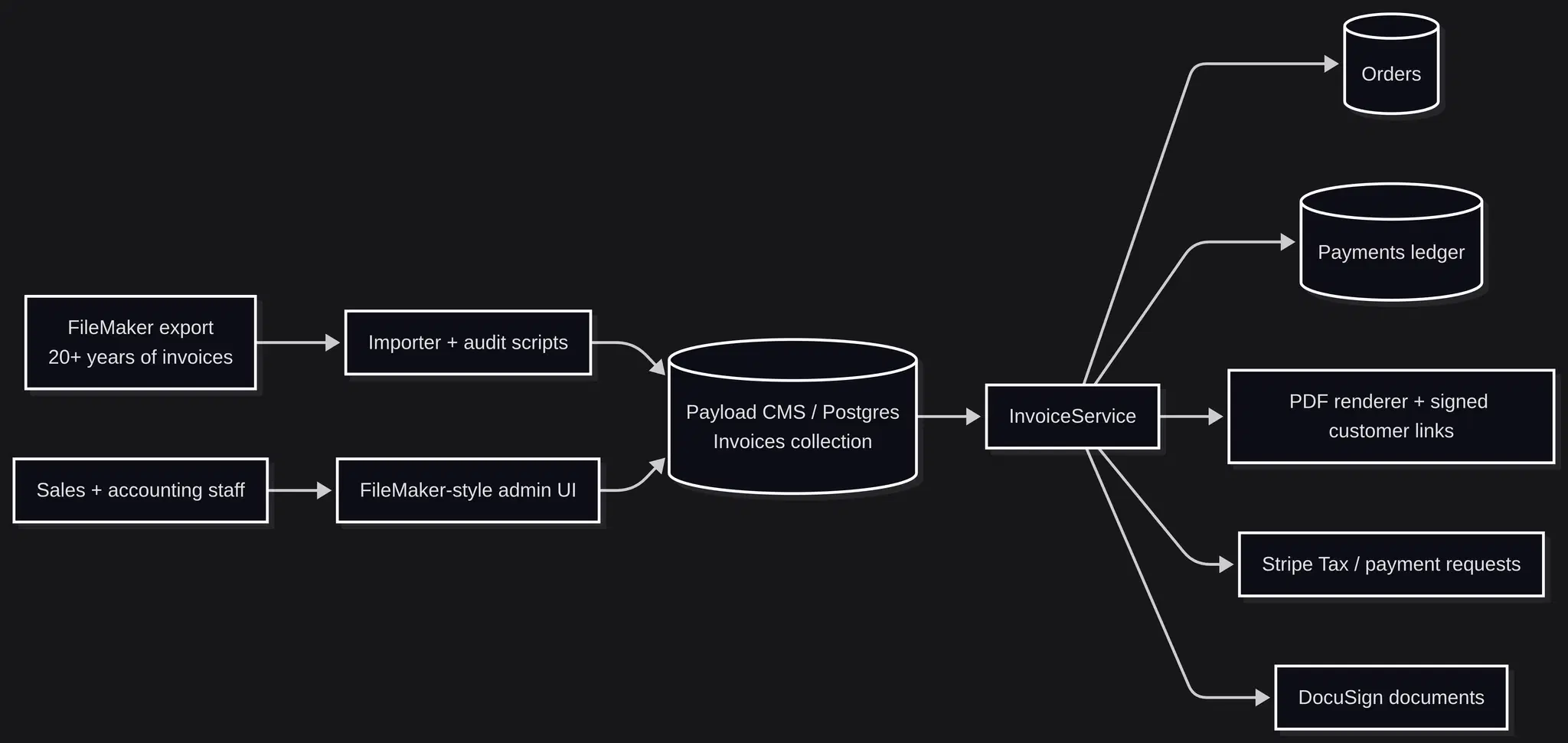
Architecture overview: FileMaker export through importer + audit scripts to Payload Invoices, then through a single InvoiceService composing with Orders, Payments, PDFs, Stripe Tax, and DocuSign.
The important part is the direction of ownership.
Invoices became first-class platform records, not screenshots, PDFs, or a thin wrapper around FileMaker. Once invoices were native records, they could participate directly in order creation, payment requests, tax calculation, customer PDF access, document signing, reporting, and future automation.
That changes the shape of the system. FileMaker no longer sits off to the side as a parallel source of truth. The invoice workflow becomes part of the same platform that owns customer records, orders, payments, documents, tax, and operational dashboards.
Rebuilding FileMaker-Parity UX Inside Payload
Payload's default admin interface is strong for CMS-style content management. This workflow needed something different.
Staff were used to a FileMaker-style found set: search, move next, move previous, jump to record, create a new invoice, duplicate an invoice, print, edit, and keep moving. A conventional CRUD table would have slowed them down.
So I built a reusable FileMakerLayout shell inside the Payload admin experience.
It provides:
- inline Find mode,
- configurable searchable fields with multi-field search,
- first / previous / next / last navigation,
- a record number jump input,
- a scrubber across the found set,
- keyboard shortcuts,
- dirty-state protection and FileMaker-like auto-saving,
- WYSIWYG editing interface with guaranteed PDF formatting.
The invoice editor sits on top of that shell and renders an invoice form that intentionally feels closer to FileMaker than a generic CMS form.
The same find flow inside the new Payload-backed admin: click the field, type the criteria, execute. Search behavior staff already know, on top of a platform-native data model.
Conti Digital - Fine's Gallery Shopping Integration Analytics 1
There was one important performance constraint: the invoice table contains more than 28,000 records.
Preloading every full invoice into the page would be inefficient and impact performance. Instead, the server returns a lean found set containing only the fields needed for navigation. The full invoice record is lazy-loaded when the cursor lands on it.
Search, count, pagination windows, and deep-link restoration are SQL-backed rather than loading the whole table through Payload.
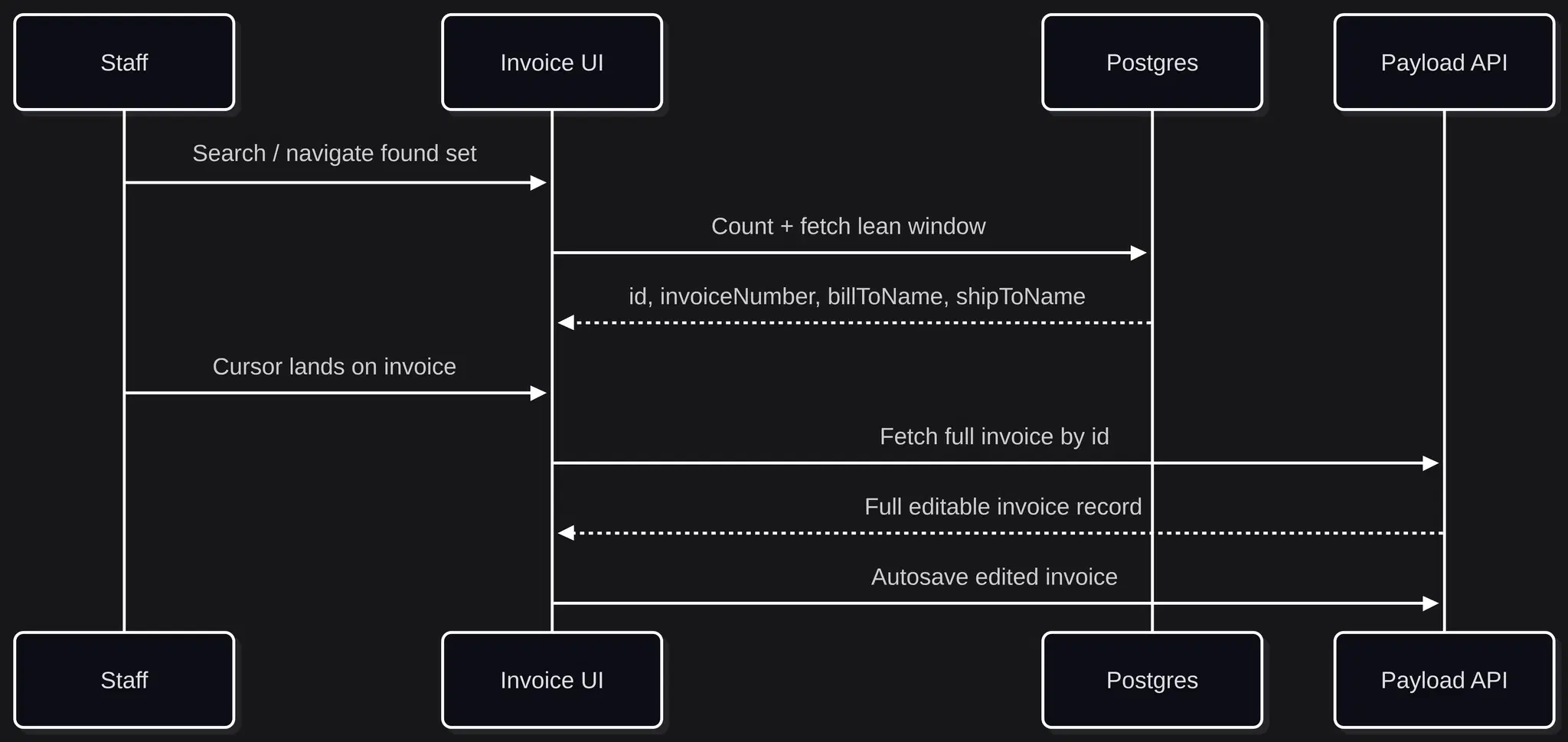
Sequence: Staff search and navigate; UI requests count + lean window from Postgres; on cursor land, UI requests full record from Payload; autosave back to Payload.
The result is a modern web UI that still preserves the operational feel of FileMaker.
That was the key product decision. The replacement did not ask staff to relearn invoicing around a generic admin table. It gave them the old workflow on top of a safer data model.
Data Modeling: Flexible Where Reality Requires It
A tempting mistake would have been over-normalizing everything.
Invoices have names, companies, addresses, phone numbers, emails, shipping contacts, notes, and many more. In a greenfield system, these might be ordered cleanly into numerous structured fields. But the historical data schema was developed over 20 years ago, and was not designed with modern data modeling practices in mind.
Staff had used FileMaker fields as flexible business cells. Some records stacked multiple names in one field on multiple lines. Some shipping contacts included labels, phone numbers, emails, and instructions in the same block. Some addresses used line breaks with care-of references or special delivery notes.
Forcing that into rigid structures would have lost information and made the replacement worse.
So the new invoice collection uses structure where the platform needs structure and preserves free text where the business needs fidelity.
Structured fields include invoice number, linked order, invoice source, stage, line items, totals, tax values, payment totals, PDF token version, lead attribution, and signature state.
Flexible fields remain textareas where the source data and staff workflow require it.
That was an intentional product decision based on how the data actually behaves in practice.
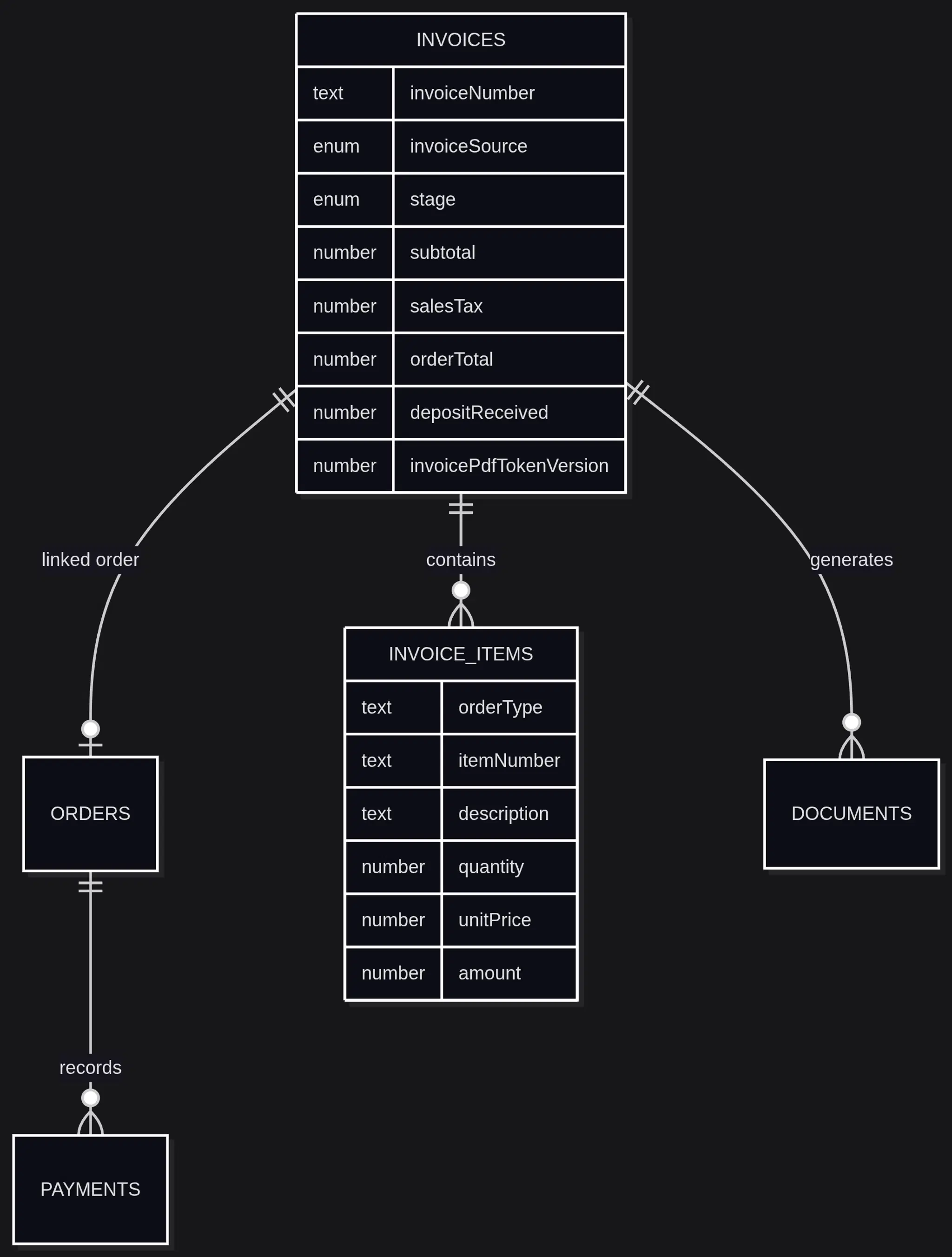
ER diagram showing Invoices (with invoiceNumber, invoiceSource, stage, totals, deposit, PDF token version) related to Orders, Invoice Items, Payments, and Documents.
The schema is not trying to pretend the business is simpler than it is. It is structured enough for automation and accounting, but flexible enough to preserve what staff actually typed over twenty years.
PDF Fidelity Was a Real Engineering Problem
The invoice PDF could not be close enough.
This was a customer-facing business document, and it needed to preserve the structure of the legacy quote form staff and customers recognized.
The first implementation risk was layout drift. If the browser UI and PDF renderer make independent decisions about line wrapping, row height, font size, and page capacity, the system becomes unreliable. A line item might look fine on screen and collide with the totals block in the PDF. A character pasted from a legacy record might render in the browser but fail inside pdf-lib.
The solution was a shared invoice planning layer.
The UI and the PDF renderer both consume a single shared planner for layout geometry, line-item sizing rules, font presets, wrapping logic, sanitization behavior, and page-capacity calculations.
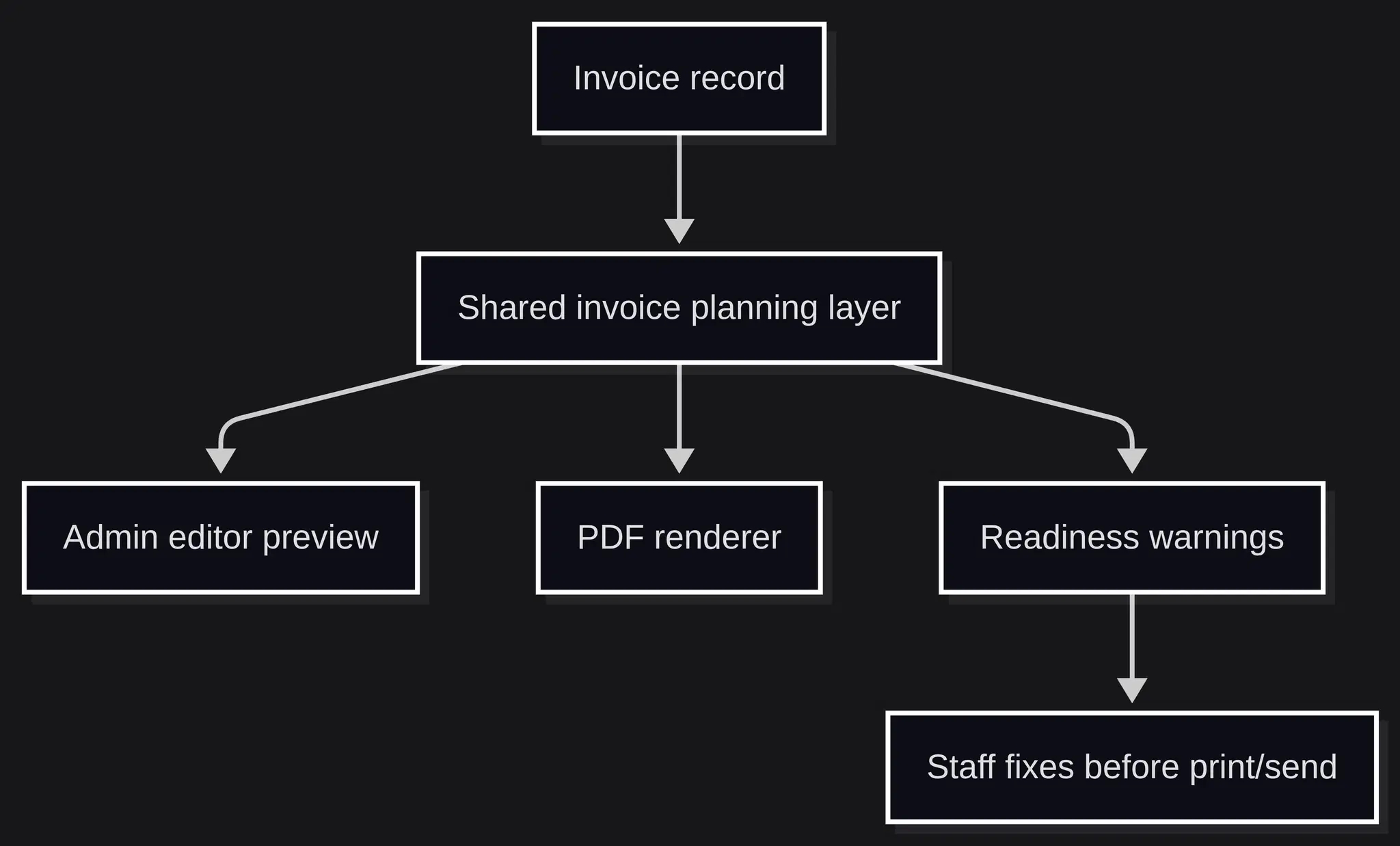
Flowchart: Invoice record feeds a shared planning layer that drives the admin editor preview, the PDF renderer, and a readiness-warnings panel staff resolves before print.
This matters because the PDF renderer is no longer guessing. It is following the same plan the UI uses.
The audit results were concrete:
- 28,003 unique invoices in the migration set,
- 28,003 fit on one page after shared planning,
- 0 required multi-page layout,
- 969 contained legacy multiline item-description control breaks.
- Multi-Page invoicing support was also added, allowing for invoices containing more than FileMaker's hard-limit of 28 line-items to be created.
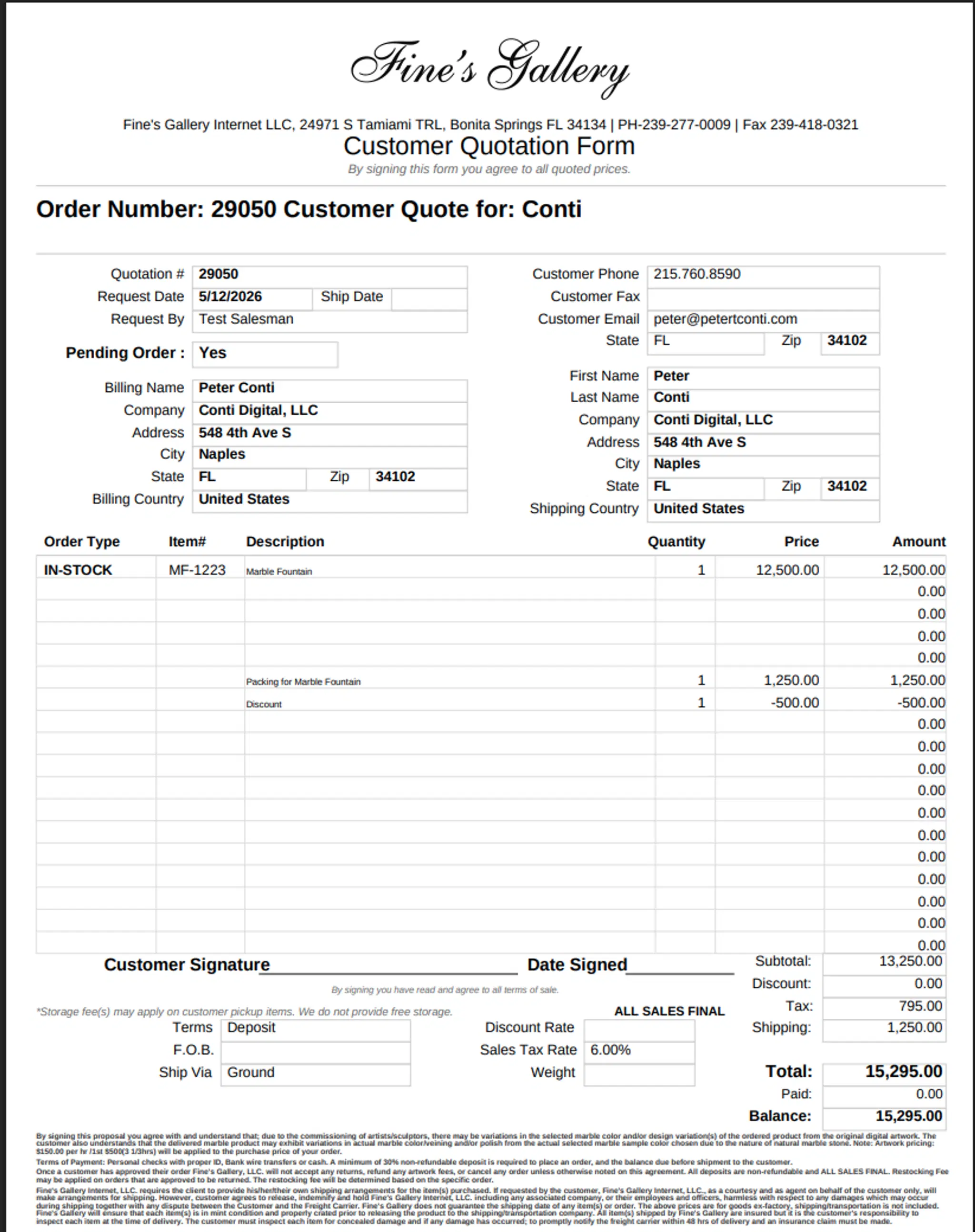
The new platform-rendered quote PDF: same recognizable layout, generated by a renderer that shares its planning layer with the admin editor preview.
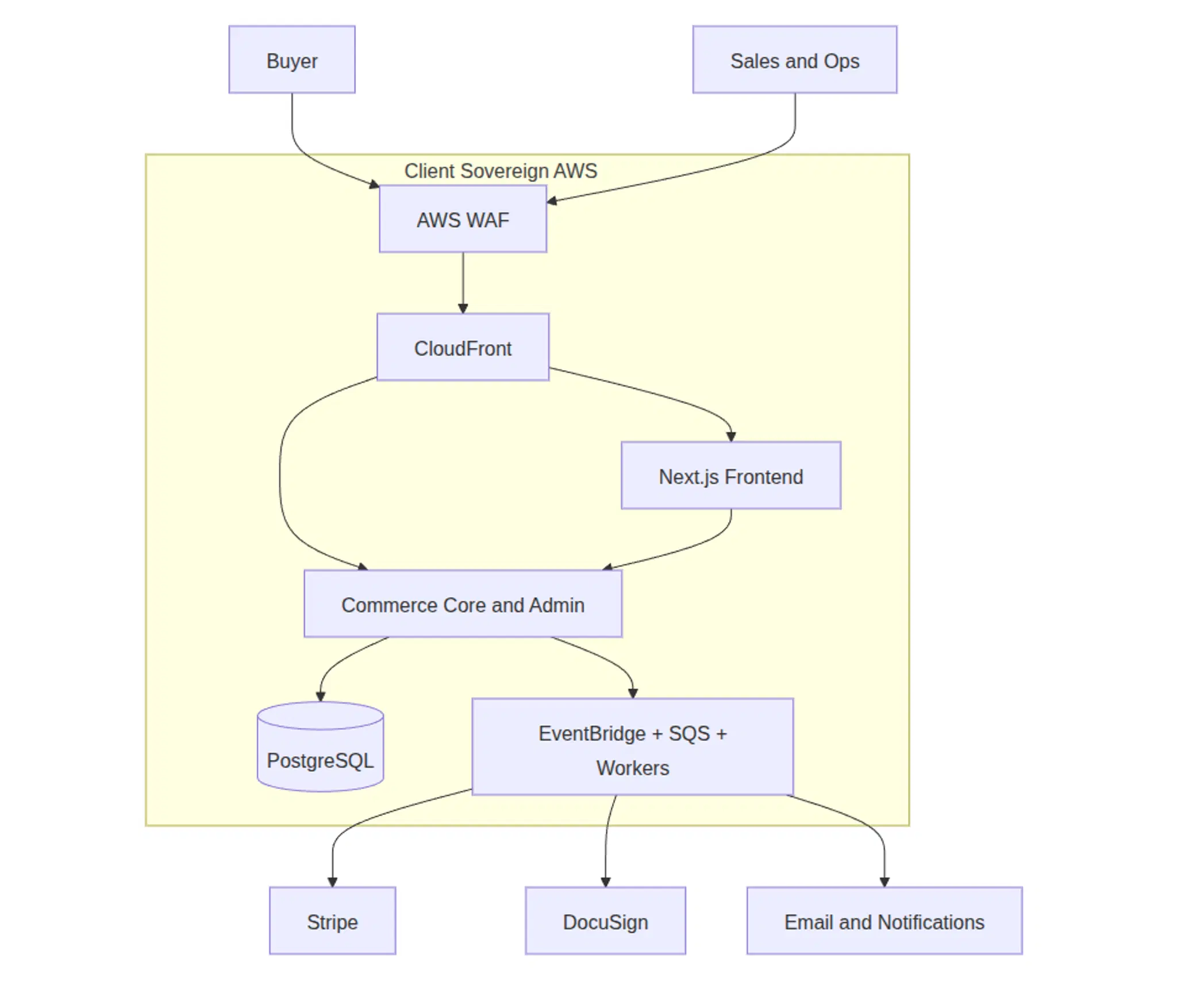
Conti Digital - High Ticket Ecommerce High-Level System Design Diagram
Those numbers changed the confidence level of the release. The PDF system was not evaluated by clicking through a few happy-path examples. It was evaluated against the actual shape of twenty years of real invoices.
The Migration Was a Controlled Production Process
The migration was not a one-time import script.
It was a rehearsed production process with dry runs, production-clone validation, strict audits, idempotent scripts, and explicit business rules for ambiguous records.
The FileMaker export contained the kinds of things you expect from a twenty-year operational database:
- duplicate invoice numbers,
- malformed rows,
- merged records,
- legacy control characters,
- non-UTF text,
- item descriptions split by literal tab characters,
- and invoice deposits that did not always map cleanly to modern order records.
The importer and audit scripts classified those cases instead of silently guessing.
The last production-clone rehearsal against the actual FileMaker dump showed:
- 28,062 unique invoice numbers in the FileMaker export,
- 28,062 Payload invoice records,
- 0 duplicate Payload invoice numbers,
- 0 invoice/order relation anomalies,
- strict payment-ledger audit clean,
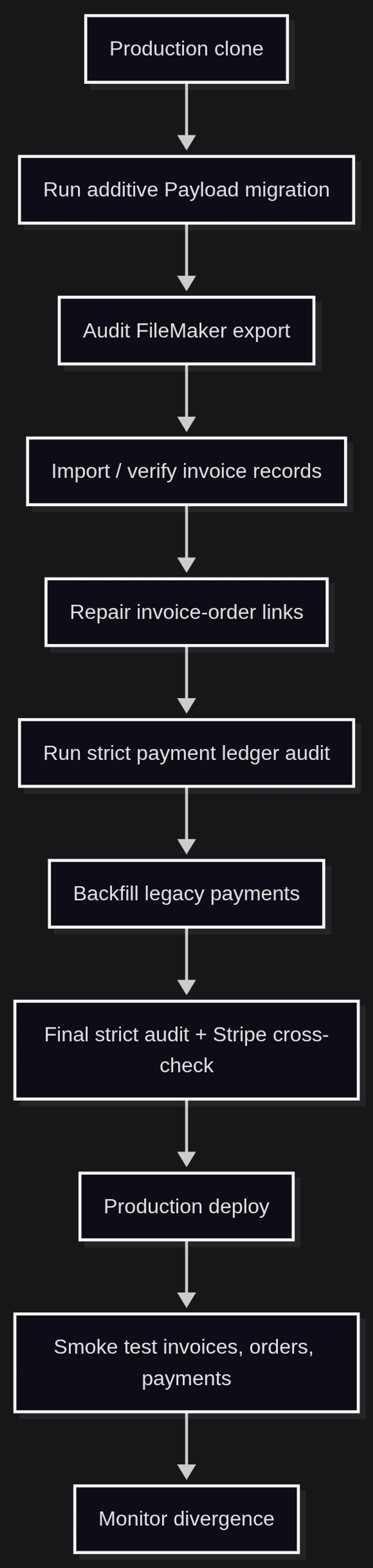
Migration flowchart from production clone through audit, import, repair, ledger audit, backfill, final audit, deploy, smoke test, and post-deploy divergence monitoring.
The rule was simple: if the system could not prove a data movement was safe, it did not apply it automatically.
That is why orphan invoice deposits were deferred by policy. Money movement is not an area where probably correct is good enough.
Native Invoices Unlock Native Workflows
Once invoices became platform-native records, the system could do more than FileMaker did in isolation.
Staff can sync an invoice into an order. That sync does not blindly trust stored legacy subtotal fields. It recomputes totals from line items, preserves payment state, carries over shipping information, and reconciles invoice deposits against the order's succeeded payments.
If staff increases depositReceived above the order's actual paid amount, the system does not silently create money. It returns a confirmation state and requires the user to explicitly authorize the delta payment.
Invoices also drive payment requests. Customers that visit in-person, call, or email have their order automatically created from the invoice record, after which staff can initiate a Payment Request. Customers placing orders on the website have their invoice records created from the order checkout data, and staff is notified to review the invoice and generate a Payment Request.
PDF links are signed. The token is bound to:
- the invoice id,
- the recipient email,
- an expiration timestamp,
- and the invoice PDF token version.
If access needs to be revoked, the token version can be bumped and previously issued links become invalid.
End-to-end invoice workflow: edit, autosave, sync to order with recomputed totals, calculate Stripe Tax, and mint a signed customer-facing PDF link.
Conti Digital - Fine's Gallery Platform Merchant Center Integration Product Approval Diagram
This is the part of the project that changes the business. Once the invoice is a real platform object, every surrounding workflow gets easier to reason about.
Testing the Workflow, Not Just the Helpers
The test coverage focuses on the business workflows that could hurt the company if they regressed.
There are tests for invoice totals, invoice-order sync, payment sync, PDF access tokens, tax handling, record ordering, FileMaker-style found-set behavior, endpoint behavior, autosave behavior, and PDF rendering.
The invoice-related implementation spans the collection schema, service layer, migration scripts, admin UI, PDF renderer, and tests. That is a signal that this was not a cosmetic admin screen. It is an operational subsystem.
The important testing principle was to cover invariants:
- invoice numbers remain unique,
- invoice totals are derived from line items,
- order totals do not inherit corrupted legacy subtotal math,
- deposit fields reconcile against actual payments,
- customer PDF links can be verified and revoked,
- PDF layout planning is shared between screen and print,
- and FileMaker-style navigation does not drop edits.
The goal was not perfect test coverage as an abstract metric. The goal was confidence around the places where a bug would create a real business problem: lost edits, bad totals, duplicate invoice numbers, broken PDFs, or incorrect payment state.
Business Outcome
The system has now replaced FileMaker in daily invoicing operations.
That is the outcome that matters.
The business no longer needs to keep the invoicing workflow isolated inside a twenty-year-old desktop database. Quotes and invoices now live in the same platform as orders, payments, documents, customer accounts, tax logic, and operational dashboards.
The replacement also removes a meaningful layer of vendor and workflow lock-in. Instead of treating FileMaker as the source of operational truth and building around it, the platform can now own the workflow directly.
There is also the simple cost side: retiring legacy tooling saves money. But the larger win is not the subscription cost. The larger win is that invoicing is no longer a disconnected island.
New features can now compose with invoices:
- customer-facing account downloads,
- payment request emails,
- signed documents,
- lead attribution,
- order state transitions,
- tax calculation,
- payment ledger reconciliation,
- future automation.
That is the difference between replacing a form and replacing a system.
What I Would Tell Someone Considering a FileMaker Replacement
If the business still depends on it, it is doing something important.
Start by understanding the behavior staff would fight to keep. In this project, that meant found-set navigation, sequential invoice numbers, flexible text fields, familiar PDFs, and fast record editing.
Then identify the parts the legacy system cannot safely own anymore: payment state, auditability, customer access, platform integration, security, tax logic, and operational reporting.
The replacement succeeds when those two ideas meet.
Preserve the workflow. Modernize the guarantees.
For businesses sitting on a legacy system they cannot quite let go of, that is usually the right starting point. I am taking on a small number of platform modernization engagements in 2026. If that is the kind of problem you are working through, you can reach me at peter@petertconti.com.
Legacy replacement works when the implementation respects why the legacy system survived.