Conti Digital - Payload GA4 Plugin Production Demo Video
Google Analytics 4 has a powerful reporting API. It also has aggressive rate limits, inconsistent latency, and no built-in caching. When I needed real GA4 analytics inside the Payload CMS admin panel for a high-traffic ecommerce storefront, I quickly discovered that there is a large gap between "call the GA4 API" and "reliable, production-grade analytics integration".
This article walks through the architecture of payload-plugin-ga4-ecommerce, a plugin I built for Fine's Gallery, a luxury marble and stone ecommerce platform generating six figures a month in revenue, and subsequently extracted into an open-source plugin for the Payload CMS community.
The plugin is available on GitHub and npm.
The Problem
Fine's Gallery runs on Payload CMS v3 with a custom Next.js frontend, deployed on AWS infrastructure I built and manage. The platform serves thousands of product pages across categories like marble fireplaces, fountains, and statues, with each generating meaningful traffic from Google Shopping campaigns and organic search.
The team needed analytics visibility directly inside the admin panel. They needed to open a product in Payload, click a tab, and immediately see how that specific product was performing: page views, visitors, traffic sources, period-over-period trends. They also needed a global analytics dashboard showing site-wide KPIs, top pages, top traffic sources, and live visitor counts.
The obvious approach - call the GA4 Data API on every page load - falls apart in production. GA4 enforces strict per-property quotas on API tokens consumed per day. An admin team opening hundreds of product pages over a short period of time would quickly exhaust quotas. Add concurrent requests from multiple admin users and the result is rate limit errors, failed page loads, and a broken user experience.
Architecture Decisions
Tiered Caching as a First-Class Concern
The single most important design decision was treating caching as a core architectural component rather than an afterthought. Every GA4 API response passes through a cache layer before reaching the client. The plugin ships two cache strategies:
payloadCollection (default): uses a hidden Payload collection as a database-backed cache. This requires zero additional infrastructure. Cache entries are stored as documents with accessedAt timestamps, and LRU eviction runs on a 30-second cleanup interval. For a single-node deployment (which describes most Payload applications), this provides excellent performance with no operational overhead.
redis: for horizontally scaled deployments where multiple Payload instances serve the same admin panel. Uses Redis sorted sets for atomic, race-safe LRU eviction. When two Payload nodes try to evict the same stale entry simultaneously, the operation is idempotent, with no duplicate deletes or race conditions.
The cache key design is intentional. Keys are derived from the exact combination of endpoint, timeframe, metrics, and page path, so a request for 30-day views on /products/marble-fireplace generates a different cache key than 7-day views on the same path. TTLs are configurable per response type because aggregate KPIs can tolerate slightly staler data than timeseries charts.
Bounded Concurrency with In-Flight Deduplication
Rate limiting the outbound GA4 API calls required more than a simple queue. The plugin implements a bounded concurrency model with a configurable maximum of simultaneous GA4 API calls (default: 4) and a queue that holds overflow requests up to a configurable maximum (default: 100). Requests beyond the queue capacity receive an immediate HTTP 429 rather than hanging indefinitely.
Another optimization is in-flight request deduplication. When multiple admin users load the same analytics dashboard simultaneously, each triggers identical GA4 API requests. Without deduplication, four users loading the dashboard generates four identical API calls consuming four sets of quota tokens. With deduplication, the first request goes to GA4 and all subsequent identical requests share the response. This is implemented using a Map of in-flight request promises keyed by the same cache key derivation: if a matching request is already in flight, the new caller receives a reference to the existing promise instead of initiating a new API call.
Retry with Exponential Backoff and Jitter
Transient GA4 failures are common enough to require automated retry. The plugin retries on HTTP 429 (rate limited), 500/502/503/504 (server errors), and gRPC RESOURCE_EXHAUSTED, UNAVAILABLE, and DEADLINE_EXCEEDED status codes. The retry strategy uses exponential backoff with full jitter to prevent issues when multiple requests fail simultaneously.
The jitter implementation is important. Pure exponential backoff (1s, 2s, 4s, 8s) causes retrying clients to synchronize their retry attempts, creating periodic load spikes. Full jitter randomizes the delay within the exponential window, distributing retry load evenly.
Dual-Layer Rate Limiting
The plugin protects both directions:
Outbound: the bounded concurrency queue described above prevents exceeding GA4's API quotas regardless of how many admin users are active.
Inbound: per-route, per-IP sliding window rate limiting protects Payload endpoints from abuse. Client IP is resolved from x-forwarded-for or x-real-ip headers (with a fallback to a shared bucket when proxy headers aren't present). This prevents a misconfigured monitoring tool or an aggressive browser extension from overwhelming your analytics endpoints.
The Plugin Interface
Global Analytics Dashboard
Conti Digital - Payload GA4 Analytics Plugin Admin View
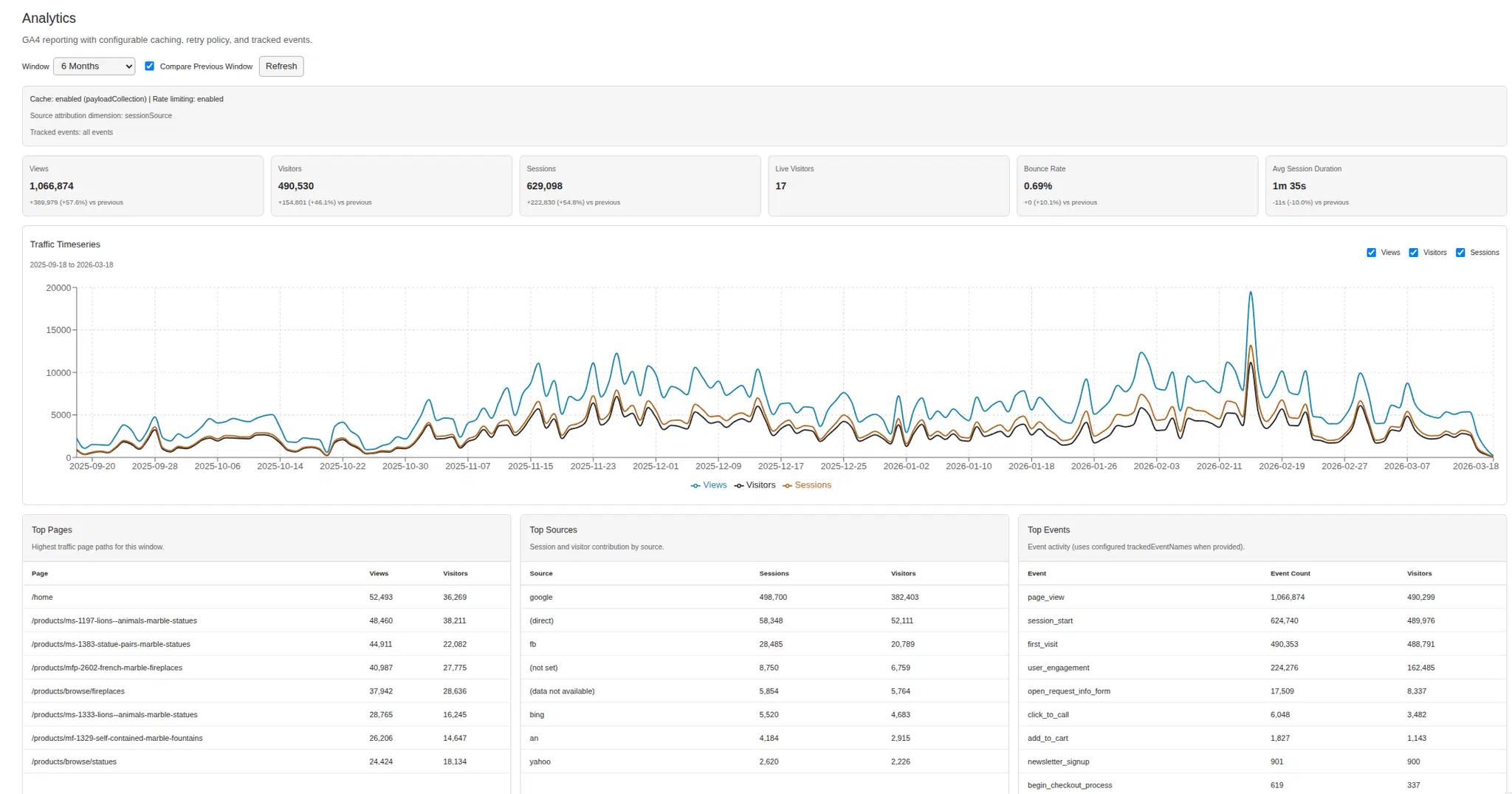
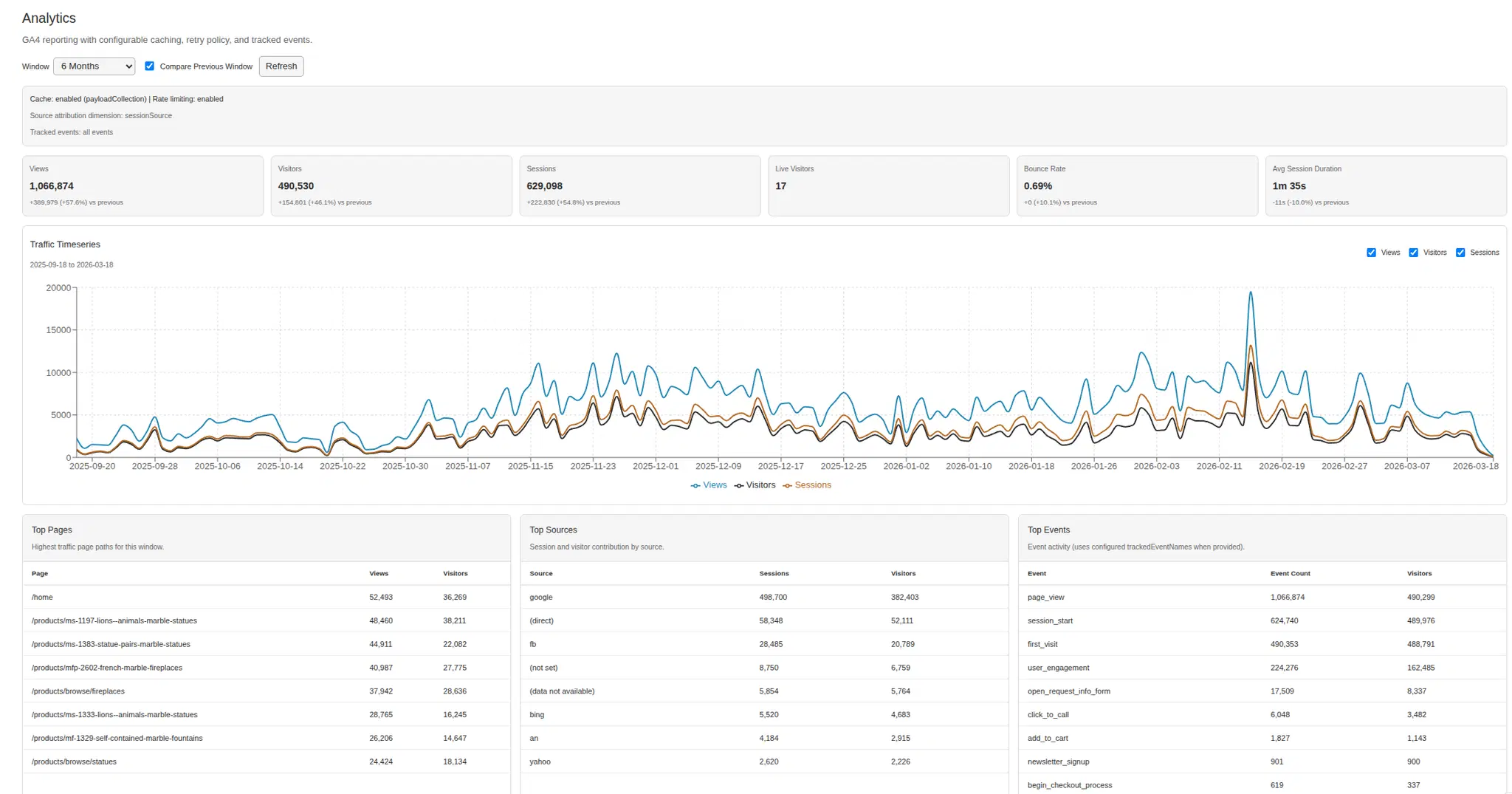
The plugin mounts a dedicated admin route (configurable, default /admin/analytics) that renders a full analytics dashboard. The dashboard includes KPI cards showing views, visitors, sessions, bounce rate, and average engagement time for the selected timeframe. A timeseries chart shows traffic trends over time. Top pages, top traffic sources, and top events tables provide drill-down visibility. A live visitor count badge shows real-time active users via GA4's Realtime Reporting API.
All data is fetched through the plugin's own API endpoints, which means every request passes through the cache and rate limiting layers.
Per-Record Collection Analytics
Conti Digital - Payload GA4 Analytics Plugin - Product-Level Analytics
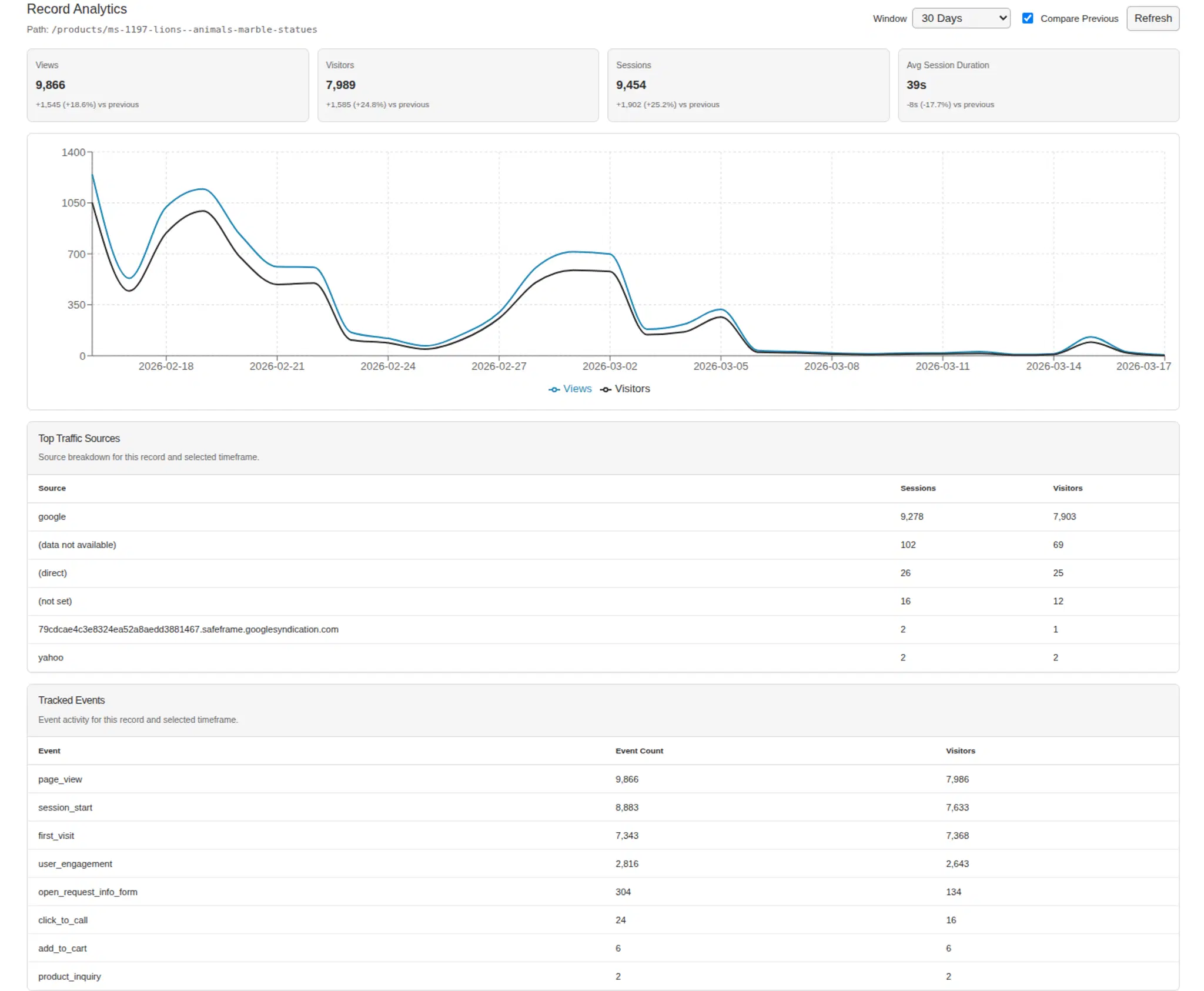
This is the feature the Fine's Gallery team uses most. When configured, the plugin automatically injects an "Analytics" tab into each collection's edit view. Open a product, click the Analytics tab, and you see that specific product's performance metrics: views, visitors, session duration, events tracked through GA4 / GTM, along with a timeseries chart, period-over-period comparison with percentage deltas, and a traffic source breakdown.
The implementation is non-trivial because Payload CMS v3 uses a React Server Components architecture with a complex field injection system. The plugin must detect whether the target collection uses a tabbed layout (and if so, append the Analytics tab at the end) or a flat field layout (and wrap everything in tabs). It also supports manual UI placement via an AnalyticsUIPlaceholder sentinel field for teams that need the Analytics tab in a specific position.
Access Control
Analytics endpoints are admin-only by default. The plugin accepts a custom access function for fine-grained role-based control:
access: ({ user }) =>
  Boolean(user && user.roles?.some((r: string) => ['admin', 'seo'].includes(r)))
This means your warehouse team can use the admin panel for inventory management without seeing analytics data, while your marketing team gets full dashboard access.
Engineering Patterns Worth Noting
Credential Management
The plugin supports two credential resolution strategies: keyFilename (reads a JSON key file from disk) and json (accepts credentials directly as an object). The getCredentials function is async, which means it can call AWS Secrets Manager, HashiCorp Vault, or any other secret management system at runtime. This is a design choice that makes a significant difference in production, as you never need to commit credentials to your repository or mount key files in your container image.
Graceful Shutdown
The plugin registers SIGINT, SIGTERM, and beforeExit hooks to clean up GA4 client connections, Redis connections, and limiter state. This prevents connection leaks during deployments, container restarts, and local development hot reloads. The createAnalyticsService() factory is exported with a destroy() method for teams that need programmatic lifecycle control.
GA4 Quota Visibility
When includePropertyQuota is enabled (default: true), every GA4 API response includes the PropertyQuota object showing tokens consumed and remaining. This surfaces directly in the admin UI, allowing operators to monitor their GA4 API usage without leaving the Payload admin panel.
What I Learned Building This
Cache invalidation: The LRU eviction strategy works well in practice, but the interaction between TTL-based expiration and LRU eviction under memory pressure required careful thought. A cache entry that's accessed frequently should survive eviction even if it's old, but a stale entry that's accessed frequently is serving outdated data. The solution was TTL-based expiration (hard cutoff for freshness) combined with LRU eviction (capacity management). Both run independently.
GA4's API: The Data API supports flexible metric/dimension combinations, but the quota system means you can't treat it like a database you query on every page load. The entire caching and rate limiting architecture exists because GA4 was designed for batch reporting, not real-time dashboard serving. Bridging that gap required treating the GA4 API as an upstream dependency that needs circuit-breaking, retry, and caching... the same patterns you'd apply to any unreliable external service.
Plugin architecture in Payload v3: The field injection system, the RSC/client component boundary, the endpoint registration model, and the admin route system all require careful navigation. Building a plugin that works correctly across different collection configurations (tabbed vs flat layouts, custom field positions, multiple plugins on the same collection) means handling edge cases that only emerge in real production projects.
Production Results
The plugin has been running in production on Fine's Gallery since mid-2025. The analytics dashboard is used daily by the business team to evaluate product performance, identify top-performing Google Shopping campaigns, and track the impact of pricing and merchandising changes. The tiered caching system has kept GA4 API token consumption well within quota limits despite heavy admin panel usage.
The plugin was extracted from Fine's Gallery's custom codebase into a standalone open-source package as part of launching Conti Digital, my consultancy focused on sovereign AWS infrastructure and high-ticket ecommerce platforms.
It's available on npm and GitHub under the MIT license.
If you're running a Payload v3 project and need real analytics inside your admin panel.. not a link to Google Analytics, but actual integrated reporting with caching, rate limiting, and per-record analytics, please give it a try. Feedback and contributions are welcome.